This Union Jack not only glows but is as thin as a flag too
It can be attached to a car window, hung up in the house... or even worn!
This glowing flag is 15cm wide and 8cm tall
It comes with 4 suckers that easily allow it to be attached to a window
And Tabs on each corner so it can easily be hung up or attached to a hat or shirt
It not only glows - it can flash too!
This special thin panel (1/3mm) needs its own driver to power it.
The power source can either be:
1) A small portable box with a clip that takes 4 x AAA batteries
2) A car lighter attachment that means the flag be stuck to a car window (window suckers are provided, as well as extension wires to help it reach a back window)
3) A Mains Plug so it can be plugged into a mains socket so can be hung up in your house
4) A USB adapter even allows your computer to feel national pride! (no flashing option)
Choose the power source you need in the box above
THIS WHOLE KIT IS ALL YOU NEED - JUST PLUG AND PLAY
EL Panel Illuminated Backlight for Spektrum DX6i and DX7 Controllers (may fit other models)
Ladies and/or Gentlemen may we present an Electroluminescent Panel and Driver/Inverter for the Spektrum controllers DX6i and DX7.
For the DX7 you will need to trim a little off the bottom of this Panel, (use sharp scissors and not a scalpel blade), and ensure that you reseal any 'cut' edges with glue before installing.
For the DX6i you will need to cut a little off the end of the Panel.
(For other models you will need to measure the screen size to see if it will fit)
The Panel size is 85mm x 55mm with a lit area of 80mm x 50mm.
The Driver should be powered straight from the device you are backlighting.
We have a choice of tiny waterproof 4.5v, 6v, 9v or 12v Drivers that are designed to be as small as possible so as not to take up too much space (29mm x 19mm x 24mm (L x W x H))
If you need help, please contact us with your requirements, and we'll work out what would be best for you.
Installing an EL Panel as a Backlight is a fairly easy procedure that basically involves accessing the screen of your device, cutting the EL Panel to the desired size, then wiring the Driver so it is powered by the device, then finally putting it all back together.
There are plenty of walk-through videos on YouTube showing step by steps on how to install an EL Backlight.
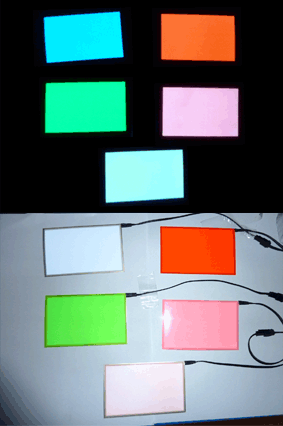
The following colours are currently available:
Deep Blue, Red, Light Blue, White, Pink, Orange and Green
EL Tape is an incredibly versatile material ithat can be bent and wrapped around things.
It can even have holes and shapes punched into it and be cut to your chosen shape.
(Please be careful not to cut too much of the outer electrode off)
We have EL Panels and EL Tapes in all sorts of sizes and colours; including animated and sound activated moving Panels.